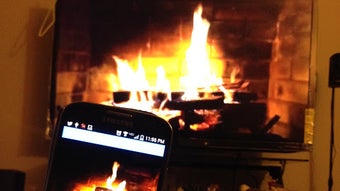

Set the Mood with Amby Cast
Overview
Amby Cast is a free Android application developed by Charles Gomes, designed to enhance the ambiance of home spaces such as TV rooms or living areas through immersive visual and audio experiences. The app offers a curated selection of ambient environments, including a fireplace, aquarium, snowglobe, and waterfall, each paired with soothing background music to promote relaxation and comfort. It is ideal for users seeking a calming atmosphere for meditation, unwinding after work, or simply enhancing the mood of a room.
The software targets casual users and home ambiance enthusiasts who value simplicity and visual appeal. With one-touch Chromecast integration, users can stream these scenes directly to their smart TVs or compatible displays. The app supports multiple ambient settings, allowing users to choose the mood that best fits their current needs.
Although specific system requirements were not provided, the app’s 45 MB size suggests lightweight operation. Real-world usage scenarios include using the fireplace during winter evenings, the aquarium for a serene daytime atmosphere, or the waterfall to aid focus and relaxation.
Key Features & Capabilities
- Fireplace Mode – Simulates a crackling fireplace with warm visual effects and ambient sound, ideal for creating a cozy atmosphere during colder months or quiet evenings.
- Aquarium Experience – Displays a dynamic underwater scene with colorful fish and gentle oceanic music, suitable for relaxation and background ambiance year-round.
- Snowglobe Visualization – Features a vibrant, 3D-rendered snowglobe with animated snowfall and colorful particles, offering a whimsical and visually engaging experience.
- Waterfall Scene – Presents a serene waterfall with flowing water visuals and calming audio, designed to evoke tranquility and mental clarity.
- One-Touch Chromecast Support – Enables seamless streaming to compatible displays with a single tap, allowing users to project ambient scenes onto larger screens.
- Multiple Scene Selection – Users can switch between four distinct environments using intuitive thumbnails, making it easy to customize the mood of any space.
Each feature is designed to deliver a consistent sensory experience without requiring user input beyond initial setup. The visual components are optimized for smooth playback, and the audio tracks are looped to maintain a continuous ambiance. These features are particularly effective in low-light environments where visual immersion is maximized. The app’s simplicity allows users to quickly select and start a scene without navigating complex menus. The integration with Chromecast enhances usability by extending the experience beyond the mobile device, turning any room into a personalized relaxation zone.
User Interface, Workflow & Performance
The user interface of Amby Cast is minimalistic and focused on visual engagement, prioritizing ease of access over advanced controls. Navigation is streamlined through a thumbnail-based layout, where each ambient scene is represented by a clear, high-contrast image. Users can select a scene with a single tap, and the app transitions smoothly into playback mode.
The workflow is efficient, requiring no setup steps beyond launching the app and choosing a scene. One-touch Chromecast integration reduces friction in the streaming process, allowing users to project content with minimal effort. The app does not appear to include customizable settings such as brightness, volume, or duration, which may be intentional to maintain simplicity.
Performance details were not specified by the developer, but the 45 MB file size suggests low resource consumption. The app likely runs efficiently on mid-range Android devices, though exact CPU and RAM behavior were not provided. Stability is expected to be consistent given the app’s limited scope and focus on media playback.
No reports of crashes or freezes were included in the provided information.
Compatibility & System Requirements
Amby Cast is designed for Android devices and was released on May 12, 2024. The application has a file size of 45 MB, indicating a lightweight footprint suitable for a wide range of Android smartphones and tablets. The developer did not specify exact system requirements, including minimum Android version or hardware specifications.
Compatibility information is limited to the operating system, which is Android. Users are advised to ensure their device supports Chromecast functionality for full feature access. The app may not be compatible with older Android versions or devices lacking built-in casting capabilities.
No additional hardware dependencies were mentioned. The lack of detailed requirements means users should test the app on their device to confirm functionality. The developer did not provide information on whether the app supports tablet-only modes or adaptive layouts.
Pros and Cons
Pros
- Free to download and use with no in-app purchases
- Simple, intuitive interface with quick scene selection
- One-touch Chromecast integration for seamless streaming
- Four distinct ambient scenes with unique visual and audio elements
- Lightweight design at 45 MB, suitable for older devices
- Optimized for relaxation and mood enhancement in home environments
Cons
- No customizable settings for audio, brightness, or duration
- Exact system requirements were not provided
- Only available on Android, limiting cross-platform access
- Visuals may appear less immersive on low-resolution screens
- Limited to four preset scenes with no user-added content
FAQ Section
Is Amby Cast compatible with all Android devices?
Amby Cast is designed for Android, but specific compatibility details such as minimum OS version or hardware requirements were not provided. Users should ensure their device supports Chromecast to use the full feature set.
Is the app safe to use?
As a free app from a known developer, Charles Gomes, and with no reported security issues, Amby Cast appears to be safe for use. It does not require excessive permissions, and its lightweight nature reduces potential risks.
Does Amby Cast require an internet connection?
The app does not require an internet connection to play its ambient scenes, as all visual and audio content is included within the application. However, a stable Wi-Fi connection is needed to use Chromecast streaming.
How often does the app receive updates?
Specific update frequency was not disclosed. Users should check the Google Play Store regularly for new versions, as the app was last released on May 12, 2024.
Can I use Amby Cast offline?
Yes, Amby Cast can be used offline. All ambient scenes and audio are stored locally within the app, allowing uninterrupted playback without an internet connection.
Final Thoughts + CTA
Amby Cast delivers a focused, high-impact experience for users seeking ambient relaxation through visual and auditory stimuli. With its four distinct scenes—fireplace, aquarium, snowglobe, and waterfall—the app provides a simple yet effective way to transform any room into a calming retreat. The one-touch Chromecast integration enhances usability, making it easy to project scenes onto larger screens.
While the app lacks customization options and detailed system requirements, its lightweight design and free access make it a compelling choice for casual users. The absence of ads or in-app purchases further strengthens its value proposition. For individuals looking to improve their home ambiance without complexity, Amby Cast is a standout option.
Download Amby Cast now and elevate your space with immersive relaxation.






.png)
